Bismuth Gradients: A Practical Evaluation for Modern Digital Design
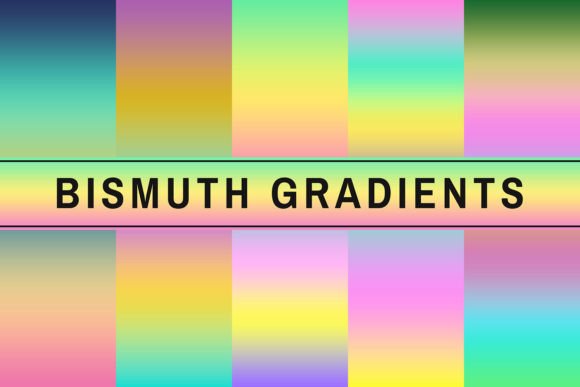
In the landscape of digital design, visual hierarchy and aesthetic appeal are often determined by subtle yet impactful elements. Among these, gradients have evolved from simple background transitions to sophisticated tools that define brand identity and enhance user interface engagement. Bismuth Gradients emerges as a curated collection designed to address the growing demand for high-quality, modern gradient assets. This resource is not merely a set of colors but a functional toolkit intended to streamline the creative process for professionals and hobbyists alike.
The primary value proposition of Bismuth Gradients lies in its accessibility and compatibility. Designed with the Adobe Photoshop ecosystem in mind, specifically targeting users of CC or higher versions, it offers a seamless integration into existing workflows. For designers who frequently toggle between different software environments or collaborate within teams using standard industry tools, this specificity ensures reliability. The product is distributed in GRD format, a standard file type that allows for instant application without complex conversion steps, thereby reducing technical friction during project execution.
Core Characteristics and Technical Specifications
Understanding the utility of any design asset requires an examination of its technical foundation. Bismuth Gradients distinguishes itself through several key characteristics that cater to contemporary design trends:
- GRD Format Compatibility: The use of the native GRD format ensures that these gradients can be dragged and dropped directly into the Photoshop Swatches panel or Gradient Editor. This eliminates the need for manual color picking or hex code entry, saving significant time during repetitive tasks.
- Premium Quality Standards: The term "premium" in this context refers to the precision of the color stops and the smoothness of the transitions. Low-quality gradients often exhibit banding or harsh discontinuities when scaled or printed. Bismuth Gradients appears to prioritize high-bit-depth rendering capabilities, ensuring that the transitions remain fluid even on large-format prints or high-resolution displays.
- Trendy and Modern Aesthetic: The design philosophy behind the collection leans towards current visual trends. This includes soft pastels, vibrant neons, and deep, moody tones that are prevalent in modern web design and social media graphics. The selection avoids dated or overly saturated combinations that can make designs look amateurish.
These features collectively suggest that the product is engineered for efficiency. In a professional setting where speed and consistency are paramount, having access to pre-validated, high-quality gradients reduces the cognitive load on the designer. Instead of experimenting endlessly with color theory to achieve a specific mood, the creator can select a preset that aligns with their vision and focus on layout, typography, and composition.
Practical Applications Across Diverse Projects
One of the most compelling aspects of Bismuth Gradients is its versatility. While gradients are often associated with web backgrounds, their application extends far beyond that single use case. The product description highlights a wide array of potential applications, indicating that this asset pack is designed for multi-disciplinary creators.
Digital Media and Social Presence
For marketers, bloggers, and social media managers, visual consistency is critical for brand recognition. Bismuth Gradients can serve as a foundational element for:
- Social Media Posts: Creating eye-catching backgrounds for Instagram stories, Facebook covers, or LinkedIn banners. The trendy nature of the gradients helps content stand out in crowded feeds.
- Website Headers and Hero Sections: Web designers can utilize these gradients to create immersive landing pages. When combined with overlay techniques, they provide depth without distracting from the primary call-to-action text.
- Video Thumbnails: High-contrast gradients can draw attention to thumbnail images, increasing click-through rates on video platforms.
Print and Physical Products
Despite being a digital asset, Bismuth Gradients has tangible value in print production. Small business owners and entrepreneurs often need cost-effective ways to enhance physical products:
- Business Cards and Branding Materials: A subtle gradient on a business card can elevate the perceived value of a brand compared to flat solid colors. It adds a layer of sophistication that resonates with corporate clients.
- Posters and Banners: For events, workshops, or promotional campaigns, large-scale printing requires gradients that maintain integrity at high resolutions. The premium quality of these files supports such scaling.
- Packaging Design: Product packaging benefits from modern aesthetics. Using these gradients on labels or boxes can help products compete visually on retail shelves or e-commerce platforms.
Creative and Personal Projects
The tool is also well-suited for personal creative endeavors. Hobbyists engaged in digital scrapbooking, paper craft, or wedding planning can leverage these gradients to add polish to invitations, albums, and decorative elements. The ease of use makes it accessible to those who may not have advanced graphic design skills but still desire professional-looking results.
Evaluating Usability and Workflow Integration
When assessing the practical value of Bismuth Gradients, it is essential to consider how it fits into real-world workflows. The biggest hurdle in using gradient assets is often compatibility. Many third-party resources require conversion or offer formats that are not universally supported. By sticking to the GRD format and specifying compatibility with Adobe Photoshop CC or higher, Bismuth Gradients mitigates this risk.
However, users should be aware that while Photoshop is the primary target, other Adobe Creative Cloud applications like Illustrator or InDesign may also support GRD imports, though functionality might vary slightly. For non-Adobe users, the utility depends on whether they can convert GRD files to PNG or JPG overlays. If the workflow involves cross-platform collaboration (e.g., using Figma or Sketch), the designer may need to manually recreate the gradients or use export plugins, which could offset some of the time-saving benefits.
The "Boost up your digital artwork" claim suggests an immediate improvement in visual output. In practice, this is true if the designer understands color harmony. A gradient is only as good as its application. Poor placement or excessive opacity can lead to muddy visuals. Therefore, the value of Bismuth Gradients is amplified when paired with a basic understanding of design principles. It acts as a force multiplier for skill rather than a replacement for it.
Target Audience and Strategic Fit
Who stands to gain the most from Bismuth Gradients? The ideal user profiles include:
- Freelance Graphic Designers: Those who juggle multiple client projects benefit from having a reliable library of trendy assets ready to deploy. It reduces the time spent searching for inspiration or creating custom gradients from scratch.
- Small Business Owners: Entrepreneurs who handle their own marketing materials appreciate the balance between quality and ease of use. They can achieve a polished look without hiring a specialized designer for every small update.
- Content Creators and Influencers: Individuals who produce high volumes of visual content need speed. Pre-made gradients allow for rapid iteration and consistent branding across various platforms.
- Students and Educators: For those learning design, studying how professional gradients are constructed can be educational. Additionally, educators can use these assets to demonstrate modern design techniques in classroom projects.
Conversely, experienced art directors working on highly bespoke, hand-painted illustrations might find limited utility in preset gradients. Their work often requires unique, one-off color palettes that cannot be replicated by stock assets. However, even in such cases, these gradients could serve as starting points or underlays for more complex compositions.
Limitations and Considerations
No design asset is without limitations. One potential drawback is the subjective nature of "trendy." Trends evolve rapidly, and a gradient style popular today may feel outdated in two years. Users should periodically evaluate whether the included gradients still align with their brand’s aesthetic direction. Additionally, while the GRD format is robust, it does not inherently include texture or noise effects. To achieve the full "modern" look often seen in web design, designers may need to combine these gradients with additional layers, such as grain overlays or blur effects, which adds a step to the workflow.
Furthermore, the reliance on Adobe Photoshop means that users of alternative software must verify compatibility. While many vector programs can import gradients, the specific behavior of color stops might differ. Testing in the primary software before committing to large-scale projects is always recommended.
Conclusion
Bismuth Gradients represents a pragmatic solution for designers seeking to enhance their visual outputs with minimal effort. Its strength lies in its simplicity, compatibility, and alignment with current design trends. By providing high-quality, ready-to-use assets in a widely supported format, it addresses a common pain point in the creative process: the time-consuming search for the perfect color transition.
For professionals, freelancers, and serious hobbyists, the investment in such a resource can yield significant returns in terms of efficiency and aesthetic consistency. While it does not replace the need for design knowledge, it serves as a powerful tool that amplifies creative capability. Whether used for crafting elegant business cards, dynamic social media posts, or immersive website backgrounds, Bismuth Gradients offers a versatile foundation for modern digital creation. As long as users remain mindful of evolving trends and software constraints, it remains a valuable addition to any design toolkit.